

Use the Blocks dropdown button on the Rich Content Editor toolbar (or the Blocks option in the Format menu) to select an appropriate heading level for the heading text you have selected or the heading text you are about to type.
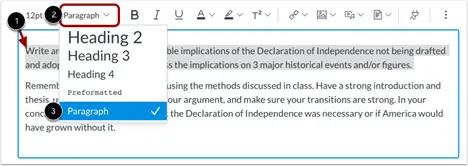
- Select the text that should be converted to a heading.
- Click the Blocks dropdown button to expand the text style options.
- Select the appropriate heading level for the text.
Image
Learn more about accessible Headings in Canvas.