

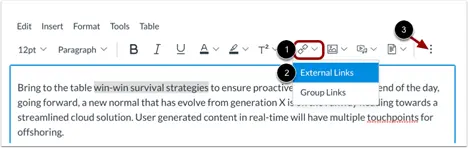
Use the Links button on the Rich Content Editor toolbar (or the Link option in the Insert menu) to create an external link by entering the descriptive link text and associated URL into the Text and Link fields, respectively, or to convert existing (descriptive) text into an external link by entering the associated URL into the Link field.
- Highlight the descriptive text that should become a link.
- Click the Links button and select External Links.
- Enter the desired URL into the Link field.
Image
See: How do I create hyperlinks to external URLs in the Rich Content Editor?