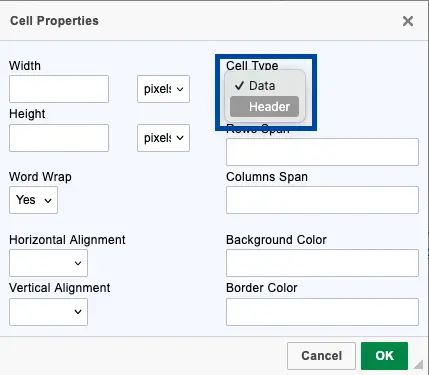
Accessible tables help all users—including those using screen readers—understand and navigate tabular data effectively. Here's how to create them:
- Use the CKEditor to insert a table via the toolbar.
- Add a header row and ensure it’s marked as a table header (<th>), not just bolded text.
- Include a descriptive caption to explain its purpose.
- Avoid merged cells unless absolutely necessary, as they can confuse screen readers. Complex tables are difficult for most people to interpret. It's best to split a complex table requiring merged cells into multiple tables to make it easier for everyone.
- OSU Drupal doesn't include the needed code to make merged cells accessible. Please consult with Digital Experience staff to build complex tables.
- Keep layout simple—use tables for data, not for visual formatting.
Step by step instructions for tables in OSU Drupal
Image

Image

Image